About this 3D model
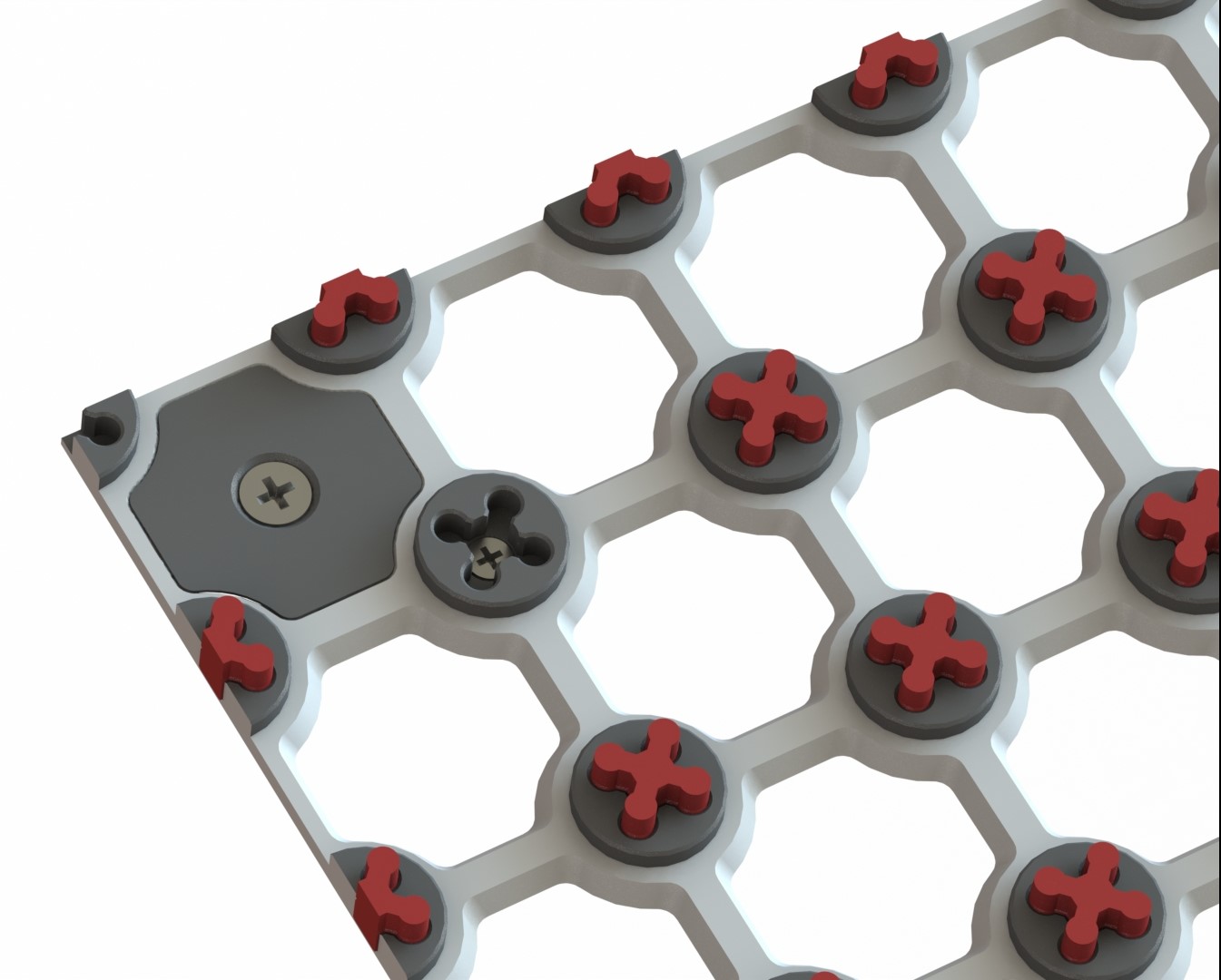
First of all, I wanted to write something about my previous work, which is what brought me here. Following the Bamboo " Lab - Tools and Accessories Box " and after its unexpected success, I would like to thank everyone, without exception, for their support and kind words. I printed the thing in ABS. In fact, it's amazing that e.g., the hotends, cutters, wipers etc. fit so well _despite_ being printed in a material that isn't dimensionally stable. All in all, stellar job! @jonas_303917 I might play around with modeling the inserts, but my skill are pretty lacking. Your skills are off the charts. The fit and finish is extraordinary. I am sure lots will use it. @JeffreyCompt_1114907 Really fantastic print, aesthetically pleasing build and helps keep spare parts tidy and organised. Was super simple to print due to the included 3mf file which orientates everything for you and gives you the correct slicer settings. The only change I made was to use tree supports as I love them for their many benefits. Didn’t have any issues with the handle, printed great. Thank you! @Daniel_404952 and the all-time best: Damn this is sexy. @BenSreRsf_328430 like from star trek :) @SametMuric_392192 But I was especially attentive to the suggestions and criticisms of the whole community. One of those things was the printing time, yes it was long, especially when done all at once. What I bring is new… Now regarding this project, this will be made available in different modules, each one adding to the previous one. This is the first, the most basic, but probably the most flexible. You can find similarities with other modular systems, especially in this case those more industrial, since that is my professional background. And believe me, there are many… This post on my blog will give you more insight into this project compared to others. The Frame It will start with the frame. It will help to organize and keep the modules fixed relative to each other. The size of it can be what you want, places one next to the other like a tile. It can fill a wall and go forever. (It looks nice on the wall) If you opt for wall mounting, there are two forms of fixation: the normal one for "normal" loads, and another, for a more robust fixation needs. All-Stars As you can see in the above image, the connection is made with the stars in red. They will be the ones that will serve as an interface with the modules. This allows a correct spacing between modules, as well as their fitting, both horizontal and vertical. You have 2 types of stars, some for the base, thicker, and others for the top, thinner. The ones you see half the size can be used on the frame edges but, only if you fill like it's necessary. Many possibilities … In addition to the wall, you can store your modules inside a drawer, so as not to pick up dust, or in a tool cabinet to store the drills by size. Currently, optimized for Bambulab printers, if there is interest, I can do for other print bed sizes, (like PRUSA, Creality and others). The blocks Blocks are volumes that you can use to place your things. There is a base one, which is the smallest block you can see on the image, all the others are multiples of them, don't worry about the stacked tolerance , I've already worried about it for you... otherwise, if you don't know what it is, even better ;) When using the frame, together with the blocks, the combinations are endless, and you don't need to fill all the empty spaces. If you need need more blocks use this this link to download an app that will allow you to choose between does that are compatible with MMSS: Tool to extract all the blocks Download Install Select the attachment icon and choose the block, or blocks with the size you need from the list The click, “Extract attachment” A Step file will be available for you to start modeling your custom module. This features all the sizes available for the MMSS. Other sizes will not fit. Other geometric formes besides squares and rectangles are possible (Example ‘L’ shapes" for that you may use Boolean operations with the basic blocks. In a wall configuration, you can make the modules thinner or thicker, and even stack them on top of each other, thus, getting a very flexible solution. Just an idea: this option needs a reinforced component due to the torque moment generated in the fixing points. If you stack blocks, the ”shaft” has to go through all o them and fixed to a Strong wall "fix.step" element and bolted from behind. If Someone justifies the use of this, I can make this solution available here. Do you like simpler? In minutes, you will have the module you need. Keep it in a drawer, next to your machine, computer, wherever you want. These simple shapes, with loose or fixed blocks, can be used as you wish and not only with tools or accessories for the 3D printer … The Boolean operation of subtraction, available in the slicer is your friend ;) You just need to have the template of what you want to use as a template. You can create someth