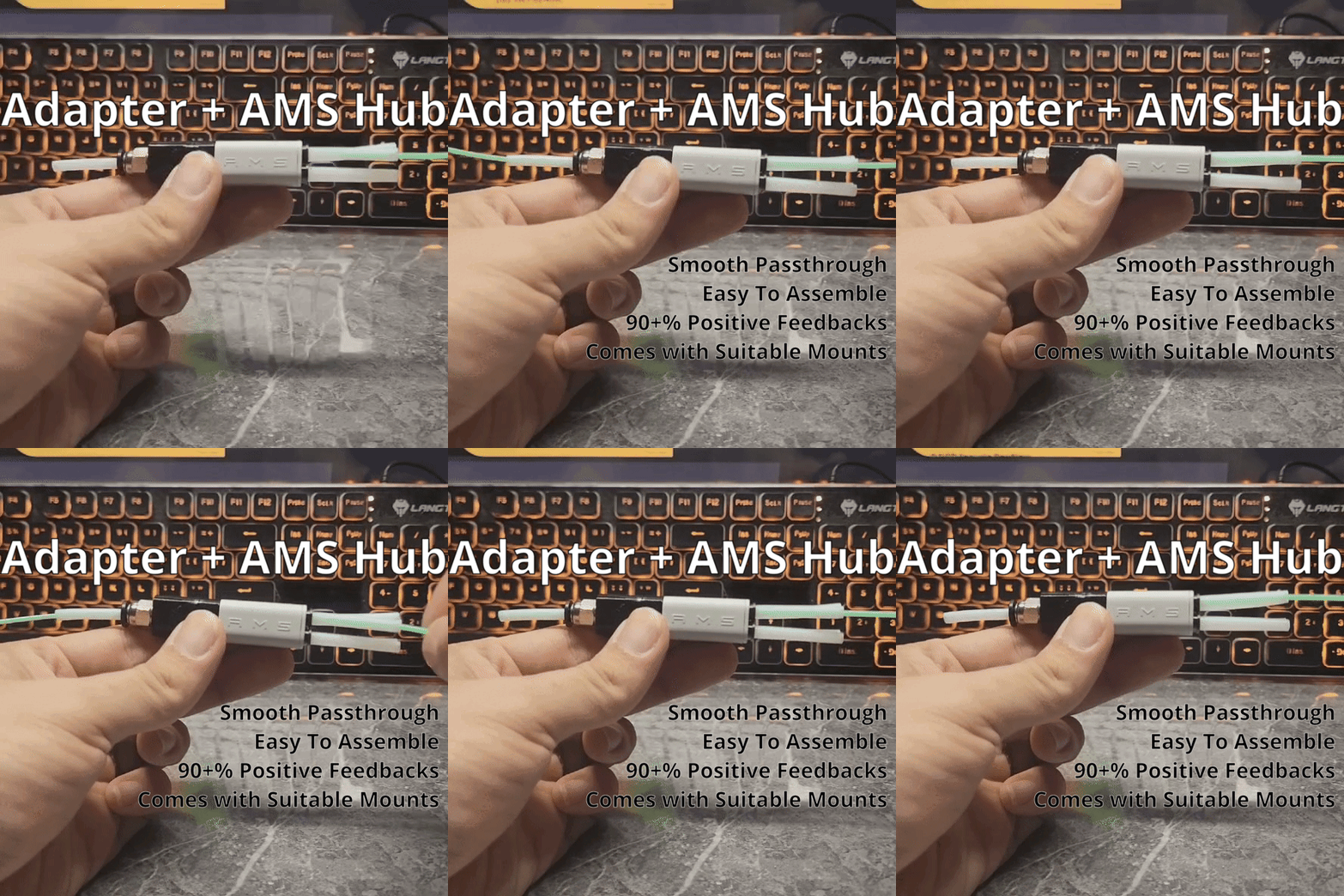
About this 3D model
I update, revise and improve my design for my fixes very often. Please only use my Print Profile (Labelled as Designer or SPStudio) to ensure this fix is updated & work well. Profile with Non-Designer tags may be of poor functionality or non updated model. Click on Like if this model helped you in some way. It is very important and will help increase the exposure of this design to more people who might need it. Cheers! According to feedback from about 3 users of their Adapter cannot fit into the Ams Hub, i have made this Special Condition version. ONLY IF you are encountering problems fitting the adapter and Ams hub together. Then please download the Special Condition Print Profile. It should be rather rare probably due to some of the M10 is built different internally compared to what most of us have. Please ensure you push the Ptfe Tube in fully after installation regardless of which version you have downloaded Update 13 Dec 6am SGT : New detailed assembly video updated. Model slightly refined for proper fitting. If you are having trouble locking the adapter together with the hub please check the video below at 1:07. Thank you. Update 20 Nov 0906pm SGT: 2 new mounting bracket have been added separately as Print Profiles, Choose whichever you need for the position you want to place the splitter. Also added a New installation video below. If you need just the splitter not the mount. You can download it under the Splitter Only Print Profile. Look No Further. This adapter combined with Bambu Ams Lite Hub will allow you to have Smooth 4 Way Splitter. Installation Video Step 1 : Screw in the Pc4-M10 Fitting into the Smooth 4 Way Splitter. It does not matter if you can managed to screw the fitting all the way in or not but do not overscrew and jam it till the internal treads is damaged. At the very minimal this need to be screwed in tight till your finger can no longer turn it, can be half or all the way in with the help of plier tools, It does not matter as long as its not loose . My tests shows that there are no changes in performance as long as its tight. Step 2: You will need to snap off the magnet (as shown in the picture) and use your nips or a penknife to trim it flush with the rest of the body. Doesn't have to be exact. Insert the hub into the adapter offset by 45 degrees, then twist it to lock it into place. Insert the Ptfe tubes only after you assembled the Splitter. That's all. now you have Smooth 4 way splitter. For the installation of bracket, please continue reading. Cut a piece of Ptfe tube 6.5cm long. Installation Video For The Mount: Please follow this to install the Bracket for the Splitter. The screw that you needed for this Fix should be in one of the package that came with the printer likely from the Filament Holder or Scrapper or just find something similar to this specification below. Its important to get the right size screw as for this fix to work properly there must be no gap from the fix to the rear panel (See instructions below) Please make sure there are no gap when you are screwing in the screws for the mount. Please make sure that Ptfe tube is fully inserted into these 2 ends before snapping into the mount. 2nd type of bracket near Ptfe Connector at the tp of the printer. Choose whichever bracket that suits your needs. Important: Please do not overtighten this during install . In my test if u were to tighten both screw lightly it will give u good holding power without tearing the mounting hole. The thickness of the mounting hole is 0.295mm it have to be this thin to allow users to use the original screw to attach this fix so please… Do Not Overtighten the screw. To change any of the 4 slots of filament source, simply put the splitter towards you lightly and it will come off the mount. Special Notes: If you want to install and mount the splitter with a side spool i would suggest checking out https://makerworld.com/en/models/67476 Its a pretty good and cool design in my opinion. Important Notes: Make sure the bowden tubes are FULLY inserted until each one reaches its stop point. After inserting each tube, you can rotate the tubes back and forth while pressing inward slightly to make sure they're seated squarely and fully. Glue Stick is recommended but should be ok without. Ptfe tubes should be cut squarely at the tip (no angled tips), use a deliciated cutter or a penknife. Pc4 connectors typically have tapered threads. As such, make sure you don't over-tighten them as they can create a “wedge effect” and can cause damage. The Technical Analysis Smooth 4 Ways Splitter? How so? With the A1 Mini launch, something incredible came with it, not many people have noticed it but the Ams Lite Filament Hub is actually the smoothest splitter made by Bambu themself and at just $5.99USD its a fantastic device to help you attach up to 4 source of filament roller / Ams / dry box into 1 Ams buffer and then to the extruder hotend. Yes this can attach 4 Ams to 1 single machine without having the need to