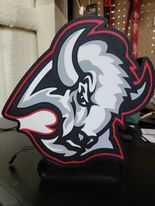
About this 3D model
RECOMMENDATIONS use a textured PEI sheet - use the print profile, it has quite a few setting changes that help achieve the best results - remove the purging lines and/or flow calibration lines during print to ovoid color fusion to the lines, this is done to maximize lightbox demensions use the LED's the further away from the colored design possible; placing them too close ruins the diffusion and the individual LED's become visible Bambu Studio Settings: I always recommend using the print profile I provided since it has settings with which I've been able to get the best results. If you choose not to here are the main slicer settings I recommend: - preferences (ctrl + P) → activate developer settings → Quality →Advanced → First Layer Flow Ratio: 1.04 - Quality → Wall generator → Arachne - Quality → Wall transitioning threshold angle → 50º - Strength → Advanced → Infill/wall overlap → 20% - Quality → Advanced → Avoid crossing walls - Increasing retraction / reducing temperature can help reducing wisps - Order color printing from lightest to darkest color Happy Printing!