About this 3D model
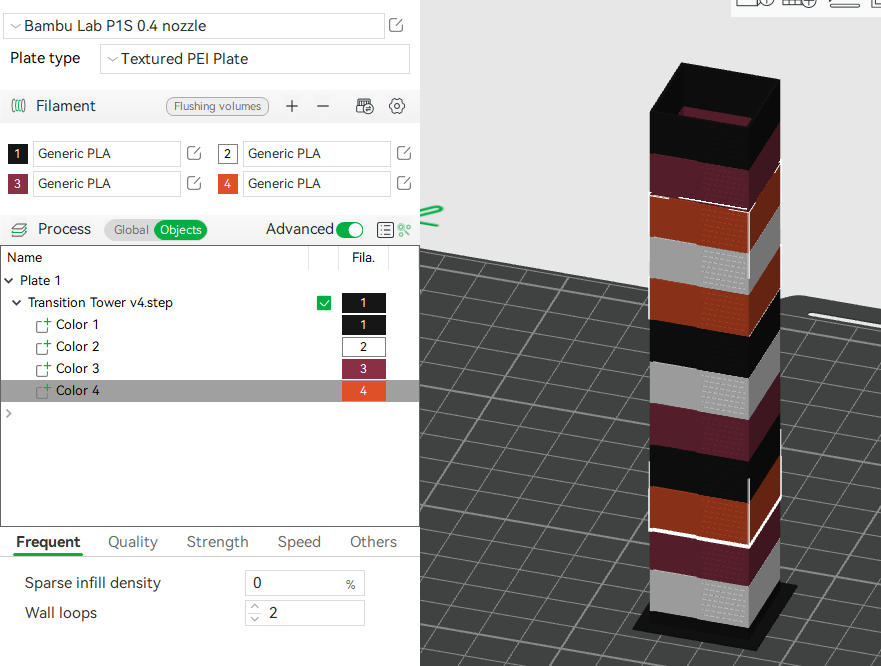
This model will help you determine the minimal necessary transition volumes for 4 colors. It's designed for a 0.4mm nozzle. Each notch on the left indicates the start of a new color, and each notch on the right indicates 100mm^3 or filament (each layer is two 0.4mm walls). Load the STEP file Under Process > Objects , assign a different filament to each of the 4 color “components” (this will populate each of the possible 12 color transitions) Set your Flushing Volumes all to 0 Use the attached printing profile, or set the following under Global settings, starting from the 0.20 Standard @BBL profile (make sure Advanced is enabled): Quality: Line Width All Line Widths: 0.4 Strength: Sparse Infill Sparse Infill Density: 0% Top/Bottom Shells Top Solid Layers: 0 Speed Other Layers Speed Inner Wall: 100 Outer Wall: 100 Others Brim Adhesion Brim-Object Gap: 0 Prime Tower Enable: false To determine the minimal transition distance, start at the left notch at the top of the transition from color, count the number of notches on the right until the transition to color is no longer any color bleed. You can test your calculated numbers with the test model at https://than.gs/m/851830.