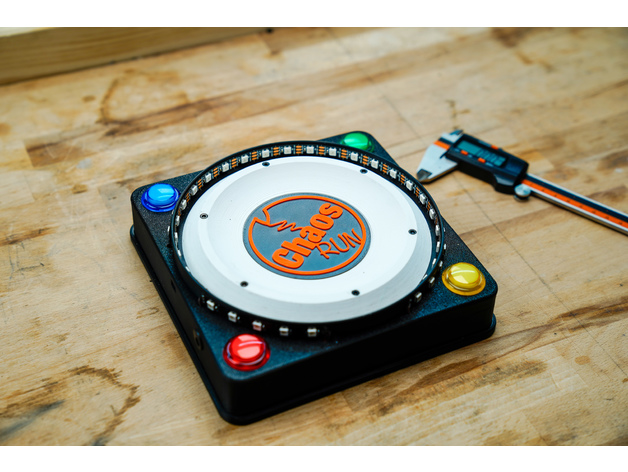
About this 3D model
Please read everything first If anything is unclear, email info@chaos-drucker.de This guide may be adjusted again later I tried to write everything down precisely, but perhaps I overlooked something The ChaosRun is a small 3D Printed LED game for a short or long pastime and, depending on the game, for up to four players I took the basic idea from here: https://www.instructables.com/id/CycloneArduino-LED-Game/ Videos on YouTube about it: How it all began: https://youtu.be/N3PX1vpEyvs (Watch until the end ;) ) Presentation of this version: https://youtu.be/0SIOfXfI0JE Game instructions: https://youtu.be/7l5n2_8hpwI The latest firmware is always available on Github https://github.com/ChaosDrucker/ChaosRun More information will also be added there The games explained briefly: Game 1 The first game is designed for 1-4 players It is a game where you have to "catch" a fixed point There is a running LED and a stationary LED You must press your button at exactly the right moment when the running LED crosses the stationary LED If you play alone, you get one point, and if you miss, two points are deducted If you play with two, three, or four players, the scoring system is the same, but only the person who pressed first gets the point If the first person to press misses, they also get two points deducted, of course This continues for 30 rounds, which get progressively faster The player with the most points at the end wins the game Game 2: The second game is purely for two players It is a kind of building game Opposite your button, you have a colored LED corresponding to your color, either red or green Next to it is a blue dot and many white ones The white ones mark the respective playing field As soon as you start the game, another light appears that continuously moves from left to right and back You must now always press in the blue field to continue building up your red or green field If you press in the wrong spot, the opponent gets a 5-move head start The first player to fill their playing field wins Instructions: When the game is connected to a power source, it enters the start menu There you can select various options: All inner and outer LEDs light up in rainbow colors Red: Select between currently two games Yellow: Select the level or difficulty Green: Adjust the game's brightness Blue: Starts the game (As of 25.6.2020 ChaosRunAlpha11.ino) Red - Game selection: Game 1 / Game 2 Yellow - Speed: 1-4 Game 2: 1-5 sweepstakes Green - Brightness: 20% / 40% / 60% / 80% / 100% Blue - Start game All inputs must be made within 5 seconds, otherwise the game will revert to start mode If you select Game 1 (press Red once in the start menu so that the outer lights are off Then press Red repeatedly until only one Red LED is visible) Wait briefly until all outer LEDs are colorful again With Yellow, you could then choose the difficulty, proceeding in the same way as with the Red button Press once until all lights are off, and then press repeatedly until you have the preferred mode After that, wait another 5 seconds until you are back in the start menu With Green, you could now adjust the LED brightness to the given lighting conditions CAUTION Do not play in direct sunlight The LEDs can be very difficult to see there, even at 100% brightness The game is then started with Blue Since Game 1 can be a multiplayer game, before it properly begins, there is a prompt asking how many players wish to participate An LED lights up on each button By pressing any button, you register as a player, and then 3 LEDs light up After 5 seconds, the game finally starts by pressing all selected buttons simultaneously Now the game and the hunt for points begin A stationary point (GREEN) must be hit with the running point (RED) When the Red point hits the Green point (in the first 8 levels, also the two Yellow ones), you must immediately press your button If playing with 2-4 people, the player who presses first always gets a point All others get nothing However, if the first person presses incorrectly, usually a bit too early, before the Red point has reached the Green one, it is a FAIL and two points are deducted This now continues for 30 rounds The player with the most points at the end wins the game Anyone who has opted for the complete set from Redline Filament does not need to flash their Arduino with the sketch https://redline-filament.com/products/chaos-run-paket Everyone else still needs to get the sketch onto their Arduino The libraries for this are: Bounce2.h PinChangeInterrupt.h FastLED.h The Arduino boards should also be up to date Required parts: Arduino Nano approx 1.5m 3-core cable 4x1 Push buttons (Red, Yellow, Green, Blue) 2x Resistors with 330 or 470 Ohm 1m WS2812b with 60LED/meter, IP30, black PCB Power supply 5V 2A with 5.5x2.5 plug Socket 5.5x2.2 Wiring: The LEDs are glued and connected counter-clockwise This is important, otherwise the sketch will not function correctly How exactly this works will also be explained in this video her