About this 3D model
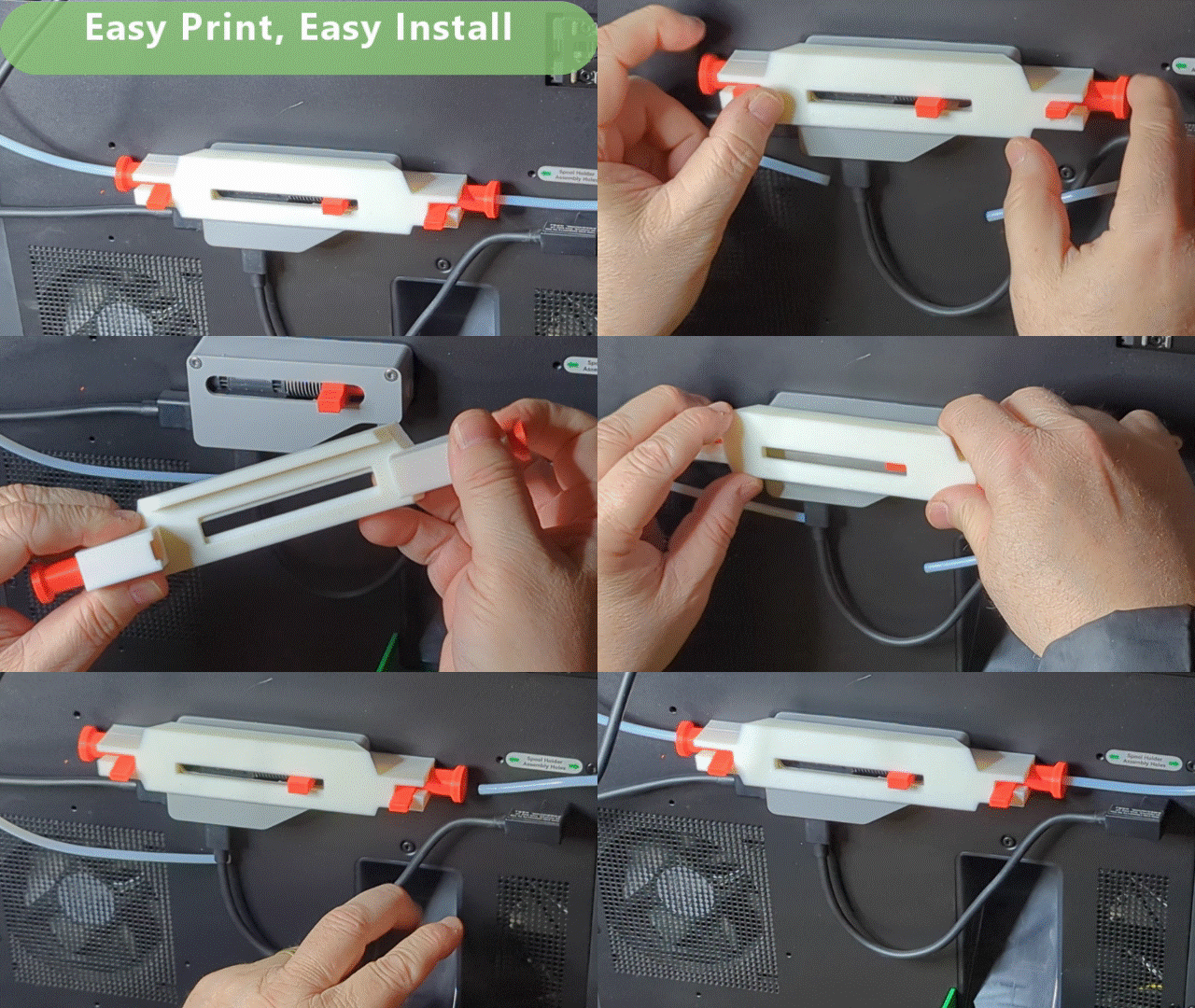
Frame will print flat with no additional support. Tested ASA, and should work with ABS. PLA and PETG have also been tested and printed well. If the static PTFE tube (Left Side) does not lock in place, push the lock to the left (As shown in the included GIF) *** The included GIF shows a complete removal and installation. Watch the GIF to see how to install this device. *** To install the tube release on the moving side (the right side, accessed through the window on the AMS buffer) : 1) Use a screwdriver or similar tool to hold the AMS spring back. 2) Insert the printed small tube guide, long side first and slide the short side into the spring To install the frame: 1) Rotate the pin locks up and retract, if installed 2) Slide the frame over the AMS buffer. 3) Insert the pin locks and rotate down to lock. 4) Make sure the static tube lock (on the left) is to the left, to allow the left side tube to lock in place. 5) Pull back on the tubes on both sides to ensure they are locked in place. Note that the one on the right should move about a centimeter (a half inch). To remove the tubing: 1) Push the locking pin on the left in (push it to the right) and pull the tube on the left to remove. 2) Push the slide (in the AMS window) to the left and pull the tube on the right to remove