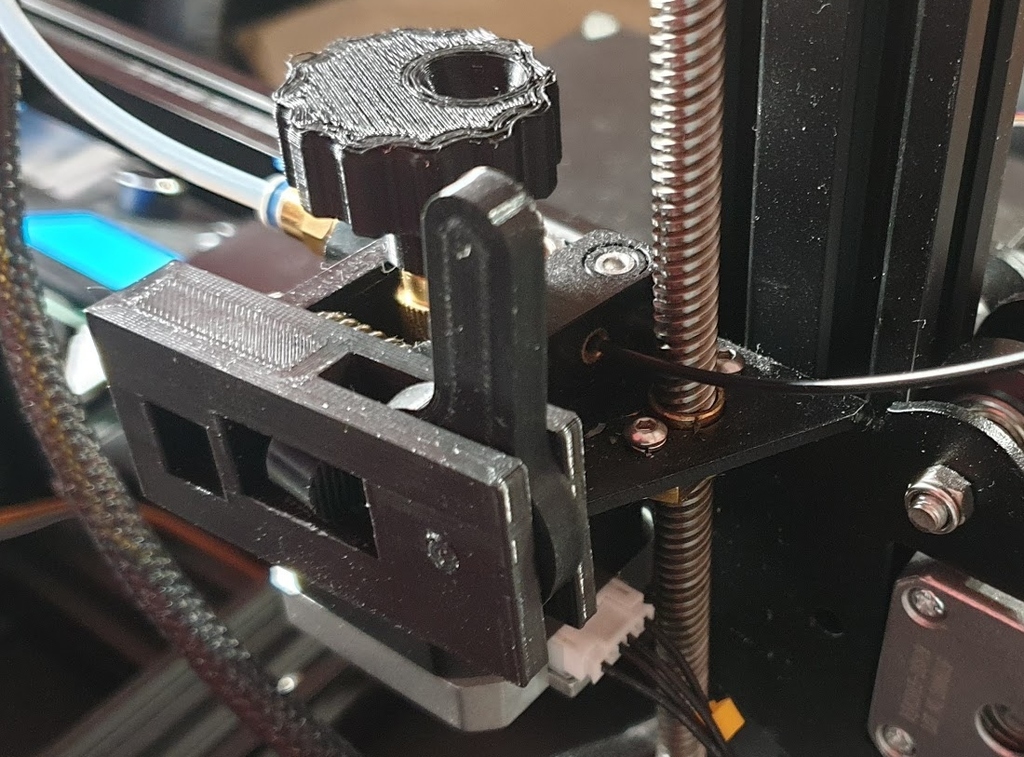
About this 3D model
Extruder arm lock for easy one-hand loading filament (Ender 3 Pro stock extruder) When changing the filament, it annoyed me to hold the extruder arm with one hand, while trying to hit the filament into the hole with the other. I have therefore created a simple tool which, by means of an eccentric lever, holds the pressed arm of the extruder and at the same time can stay placed on the extruder. Place the tool with the narrower side next to the extruder. First attach the rear end and then thread the front hole onto the extruder arm. It is better to position the lever so that in the down position, its narrower side points towards the hole (by moving up, the arm of the extruder is pressed). The pin can be replaced with an M4 screw Print Settings Printer Brand: Creality Printer: Ender 3 Pro Rafts: No Supports: No Resolution: 0.2 Infill: 20% Filament: Creality PLA Black Notes: Print the lock body with the longer side down Supports are not necessary, but it is sufficient to print them only in the middle of the longer hole Post-Printing If the pin does not hold in place, heat its end with a lighter, for example, and press it lightly Category: 3D Printer Accessories