About this 3D model
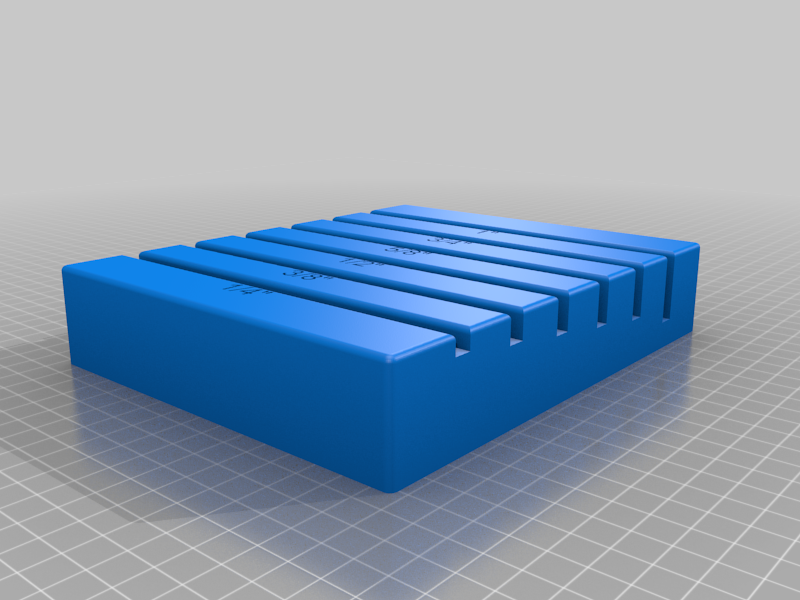
Summary This depth gauge can be used to set the cutting depth of your circular saw. Just loosen the saws depth-stop and place the blade in the appropriate slot, making sure a blade tip is facing directly down). Then tighten the depth-stop. There are 6 common depth on the gauge. You can also use it to set the depth of a table saw by flipping it over it over. Along with the "stl", the Fusion 360 "f3d" file is provided so you can modify it to your liking. The file produces a gauge about 7.25" x 6". This is large and so takes a long time to print. In Cura I resized the 7.25" to 6" (82.75%) and the 6" to 4" (66.7%) and printed it. Prints faster and I think I like the smaller one as it stores better....you choice (just don't resize the Z direction). Credit is given to to Popular Woodworking magazine, and Serge Duclos, for the idea. https://www.popularwoodworking.com/tricks/circular-saw-depth-gauge/?utm_campaign=PWW%20-%20NL%20-%20Weekly%20Newsletter&utm_medium=email&_hsmi=206148592&_hsenc=p2ANqtz--TRlwZzcWFHWqwEtgBUOH3T661NfySMdH9l-rYyrIWBDNTeo0Mf5JeffrG3OzuRw4gQ2nrOavZFu55B9fJm2gQkrbLjBS1IomYvJmEgAYirF6CKqQ&utm_content=206093056&utm_source=hs_email Print Settings Printer Brand: Creality Printer: Ender 3 Pro Rafts: Doesn't Matter Supports: No Resolution: 0.2mm Infill: 20% Filament: Hatchbox PLA Notes: I set the numbers of top layers to 15 to make sure the blade tip doesn't cut into the slot.