About this 3D model
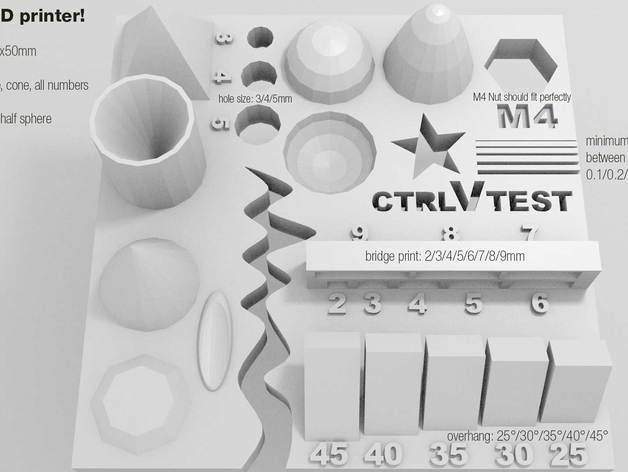
New version 3 here: https://makerworld.com/en/models/54359#profileId-56081 This is a hard to print testfile! often you don't know if your printer is ready for complex files. with this file you have an easy option to check problematic printing/slicing stuff. does your printer challenge this ultimative part? check it out and get (almost) instant results. these test are included in this tiny file: size: the object is 4x50x50mm (baseplate) hole size: 3 holes (3/4/5mm) Nut size: M4 Nut should fit perfectly fine details: pyramide, cone, all numbers rounded print: wave, half sphere minimum distance between walls: 0.1/0.2/0.3/0.4/0.5mm overhang: 25°/30°/35°/40°/45° bridge print: 2/3/4/5/6/7/8/9mm surface: all the flat parts there could be a lot of things go wrong, here the most common ones your printbed is not leveled (should be better than layerheigth you're printing, e.g use a Micrometre) your axis (Y/X/Z) clearence (with higher speed you also get problems with the moving mass) your slicer and configuration (every slicer handles things different and could contain bugs) retract settings (not correctly set you will see blobs or holes on every retract position) to high temperature (small details will get overheated) to reach this time, your printer should run between 60-200mm/s, infill as fast as possible. not every printer works in this range, so try to figure out where you're printer limit is. text is hard to read > use a smaller nozzle/other slicer Instructions infill: 33% infill or similar layerheight: choose the smallest possible layerheight. optimal 0.1mm or lower print time: about 50 minutes, depending on your printer & settings. ) to reach this time, your printer should run between 60-200mm/s) creation by ctrlV at Test your 3D printer!