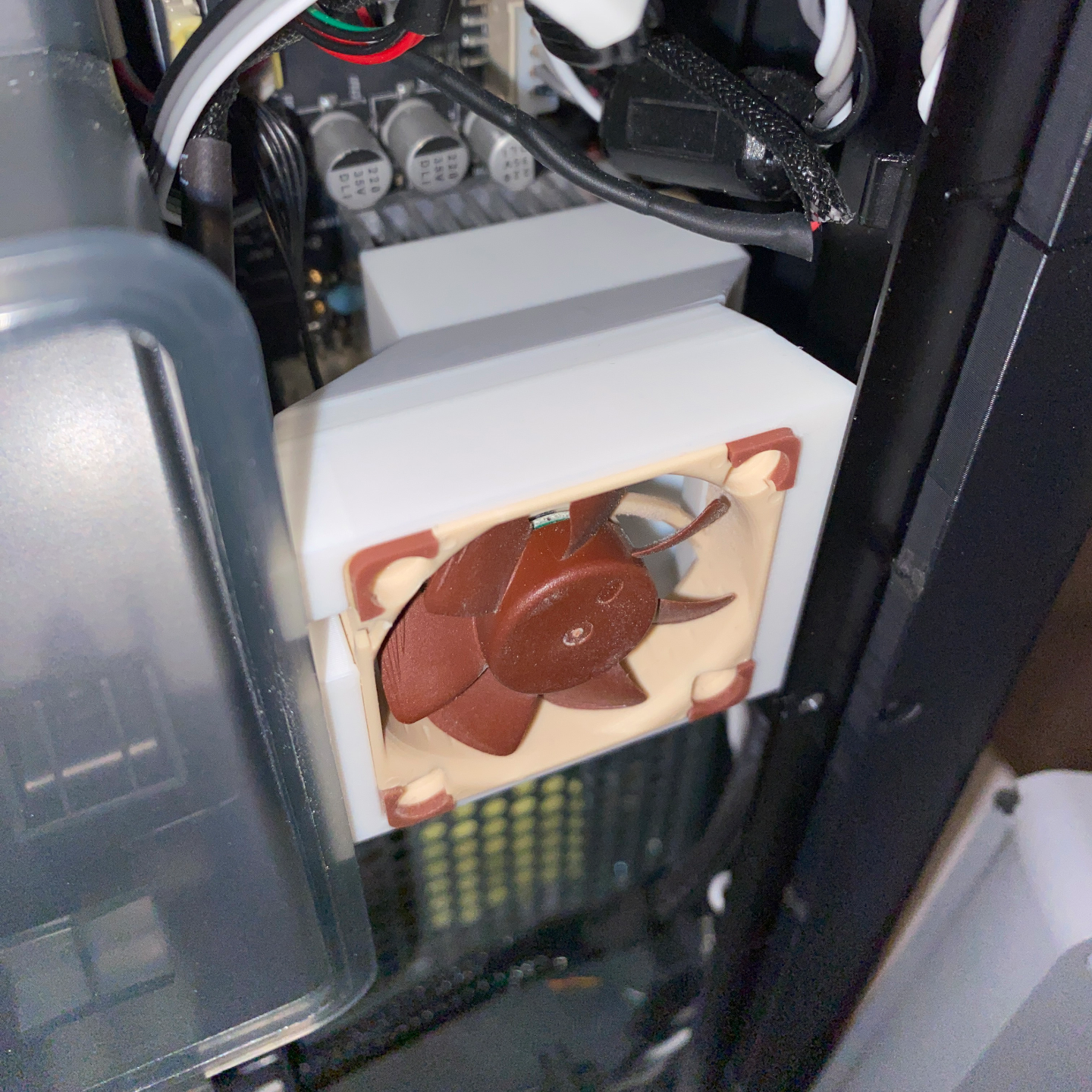
About this 3D model
Update 11/17/2023: I've uploaded new versions of the 38x20mm fan ducts based on some feedback from a user over the fit. If you have downloaded this previously and are having issues, try the new version. This is a fan bracket for various Bambu Lab printer's control boards. It is highly recommended to use a fan on the heat sink if you are running your printer enclosed to avoid overheating. The X1C and P1S come with control board fans, the P1P does not, but it can be added individually, or with the P1P to P1S Upgrade Kit. The original Bambu control board fan is in a difficult to reach area, and replacing it is a tedious process. The fan is also relatively noisy, and as it is a consumable, it will need to be replaced at some point. This mod's purpose is to move the fan to an easier to access location for periodic fan blade cleaning, along with the option to replace it with a much quieter Noctua fan. This mod does not involve taking apart the printer except for removing the back cover to install it. You do not need to remove the poop chute or the heat sink to fit it, and you can place the back cover on after the install. If you already have the stock Bambu fan in place and it has failed, or you would rather use a Noctua, you can unplug it, and leave it in place and continue with this mod if desired. It does not need to be removed. If you would like to remove the original fan, here is the process: https://wiki.bambulab.com/en/x1/maintenance/replace-mc-board-fan While I do recommend using one of the Noctua fans listed below due to their reliability and low noise, you can use the Bambu fan found here: https://us.store.bambulab.com/products/control-board-fan The only advantage I can see in using that fan over one of the Noctuas is you can just plug it in, and won't have to cut/splice wires. Here are the specs comparing the three fans: Bambu Lab Control Board Fan: 4000 rpm, 3.68 CFM, noise level not published Noctua NF-A4X10 5V PWM: 5000 rpm, 5.24 CFM, 19.6 dB Noctua NF-A4x20 5V PWM: 5000 rpm, 5.53 CFM, 14.9 dB For the purpose of this mod, I recommend using a 5V Noctua 40x10 or 40x20 fan and connecting it directly to the control board. This will require cutting/stripping the fan's cable, and connecting a JST MX 1.25mm pitch 4-pin connector. The fan will be powered whenever the printer is on if wiring just the red and black and running P1P firmware 1.02.03 or lower. If using firmware 1.03 (released June 7th, 2023), you can now use all four wires, and control the fan via M710 g-code. You can read how to use the fan's g-code here: https://wiki.bambulab.com/en/p1/manual/p1p-to-p1s The basic process in the article above is: To install and turn on the MC fan, you can add “M710" G-code once in the "Machine start G-code" and start a print, and the machine will save the settings. M710 A1 S255:turn on the automatic control of the MC fan,the MC fan will automatically turn on when the stepper motor is turned on and turn off when the stepper motor is turned off; M710 S0:turn off the MC fan. If you are using the Bambu MC fan, it has four wires and will follow the M710 g-code commands. The Noctua will also if wired with four wires. Some users prefer the fan to be on at all times are only use the red and black wires. It will run at 100% at that point, and cannot be controlled to be on/off, or set to a specific speed. The S255 in the g-code above is the speed. S127 for example would run the fan at 50% speed. IMO, the 20mm Noctua fan, even at 100% speed is virtually silent, and having it on whenever the printer is on will not harm anything, and will keep your control board cooler, which is a good thing. It will build up more dust on the fan blades running 24/7 vs. running when needed however, so pick your poison. There are six version of the fan duct available for you to print. Bambu has released the P1/X1 series with three different sized heatsinks over time. Originally, the X1C had 35x18mm heatsinks, and the P1P had 39x22mm heatsinks. Some users have reported newer models of the P1 series having 35x18mm heatsinks, and most recently, I've been told there are now models out with 38x20mm heatsinks. I don't really understand the variance other than maybe Bambu is having stock/supplier issues for certain sizes. The bigger the heatsink, the better, but as end-users, we don't really have any control over what size our printer comes with. If you are unsure of your size, you can try measuring with a small metric ruler/caliper, or just print out a version and see what fits. If it's a new model, you might want to start with the 38x20 as that seems the most recent revision. Besides those three sizes, there are also fan duct versions for 10mm and 20mm thick fans. If you are using the Bambu MC fan, that is 10mm thick. You can buy either a 10mm or 20mm Noctua fan, and then use the appropriate sized bracket. If you are ordering a Noctua fan, I'd get the 20mm myself as it is quieter and pushes more air, but many of us with other 3D printers have 40x