About this 3D model
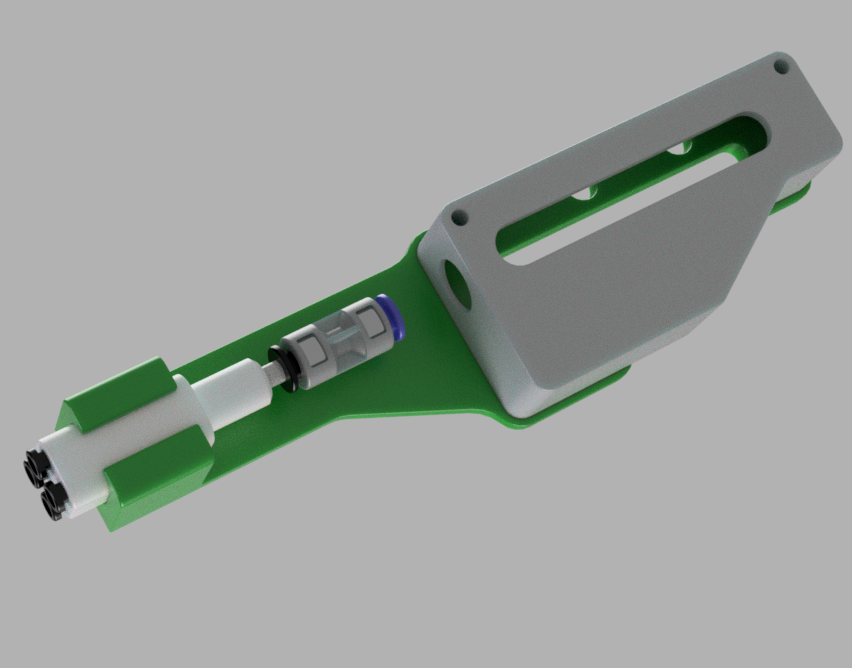
My AMS Hub was getting noisy, caused by filament grating on 2 of the input paths. I've been wanting to test replacing this with the A1 lite hub and now it's finally in stock I can! Other models have since been released but I prefer this approach :) Note that this is just a mount and no other printed parts are required, however 2 parts from Bambu labs are needed: Note2: Bambu have changed the screws they supply on the back, you may need to pickup some slightly longer M3 screws. AMS lite Filament Hub https://uk.store.bambulab.com/products/ams-lite-filament-hub https://us.store.bambulab.com/products/ams-lite-filament-hub https://eu.store.bambulab.com/products/ams-lite-filament-hub PTFE Tube Connector https://uk.store.bambulab.com/products/ptfe-tube-connector https://us.store.bambulab.com/products/ptfe-tube-connector https://eu.store.bambulab.com/products/ptfe-tube-connector Printing The included 3mf file prints the mount with supports for the raised section, this is required. While the model prints - a little prep Firstly the AMS lite hub needs a litte trim, see picture below and cut with your side cutter. Secondly, Ive seen other people inserting this end directly into the filemant buffer and I'm not a fan of that approach. I tried this and things got stuck very quickly. The outside diameter of the hub is every so slightly too big and needs to be sanded IMO. Test fit into the PTFE connector and if it fits brilliant, if it doesnt its time for sand paper :) Sand here, run the sand paper around this section for a few minutes and keep testing fitting into the PTFE connector. Once its a nice fit and releases without issues, we are ready :) Note Note the correct way the PTFE connector is placed, black part of the connector is input and blue output, as shown: Fitting Remove the supports fom the mount, should be very simple. Remove the original filament buffer and re-mount on top of the printed mount, using the same screws. Cut a piece of PTFE tubing around 45mm and insert in the blue output side of the connector, and slide the splitter into the mount as shown in the picture and insert into your filament buffer. Insert your AMS x (up to 4) PTFE tubing into the AMS lite splitter, be sure to push all the way in. Boost Me Like share and boost if you enjoy :)